Schedule with clarity.

Free, browser-based project scheduler with real CPM engine power — that explains every scheduling decision.

Built by a Program Manager with 13 years of automotive experience.

Download Free

No account required · No installation · Works offline

Animated preview — Gantt drag & scroll, view switching, live scheduling

Your scheduling tool shouldn't need a training course.

MS Project takes 100+ hours to master and costs $360/year. Primavera P6 starts at $3,500. Smartsheet looks nice but can't calculate a critical path. Monday and Asana are great for task lists — not for real schedules with dependencies.

So teams retreat to Excel. They lose dependencies, auto-scheduling, and critical path — the things that actually prevent deadline surprises. There's a gap between "expensive and complex" and "simple but shallow."

"I spend more time fighting MS Project than actually managing my project."
— PM, r/projectmanagement
"We can't use Project because it costs a lot to license everyone and it can be difficult to understand."
— MPUG survey respondent
Scheduling Power ↑
P6 MS Project
★ Hedera
Excel
Monday Asana
Ease of Use →

Built different.

Six things that set Hedera apart from every other scheduling tool.

Excel-Like Editing

Click a cell. Type. Tab to next column. Enter to add a task. No dialogs, no forms, no wizards. If you know Excel, you know Hedera.

Real Scheduling Engine

Four dependency types (FS/SS/FF/SF) with lead/lag. Critical Path Method with forward and backward pass. Auto-scheduling that cascades through the entire project.

Transparent Scheduling

The feature no other tool offers. When Hedera moves a task, it tells you why. Right-click any date → "Why this date?" → see the driving dependency chain.

Zero Infrastructure

No server. No account. No subscription. No installation. Open the HTML file in any browser. Works offline. Data stays on your machine.

Portable .hds Files

Your project lives in a single .hds file — lightweight JSON. Email it to a colleague. They open it in their browser. The file IS the project.

Review Mode

Built-in audit trail. Start a review → make changes → finish → get a summary of everything that changed. Copy to email in one click.

Three perspectives. One schedule.

Gantt View

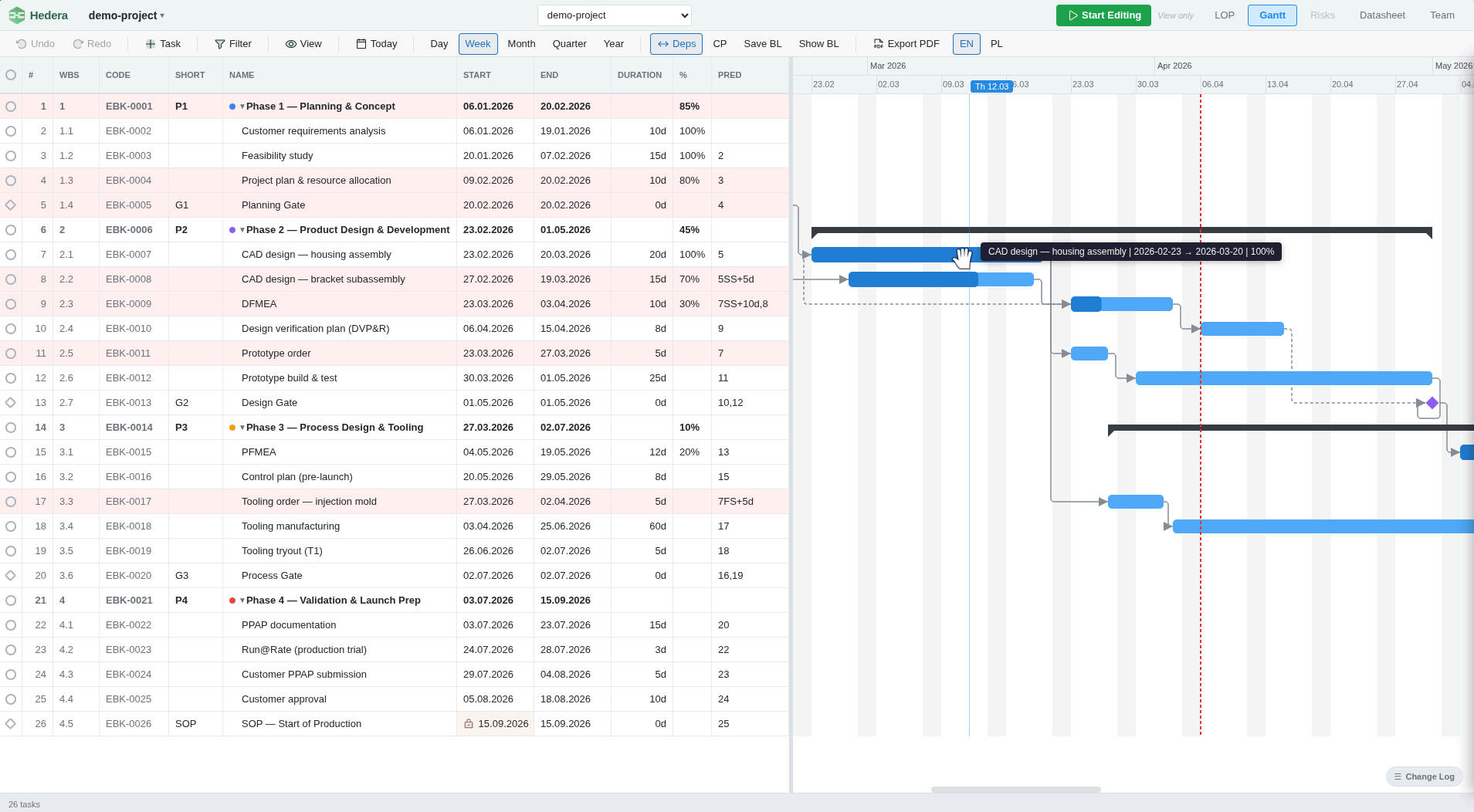
The classic split-pane: editable task table on the left, interactive timeline on the right. Drag to reschedule. Resize to change duration. Draw dependency arrows between tasks. Five zoom levels from day to year. Critical path highlighted in red. Today indicator. Weekend shading.

Hedera Gantt View

LOP View

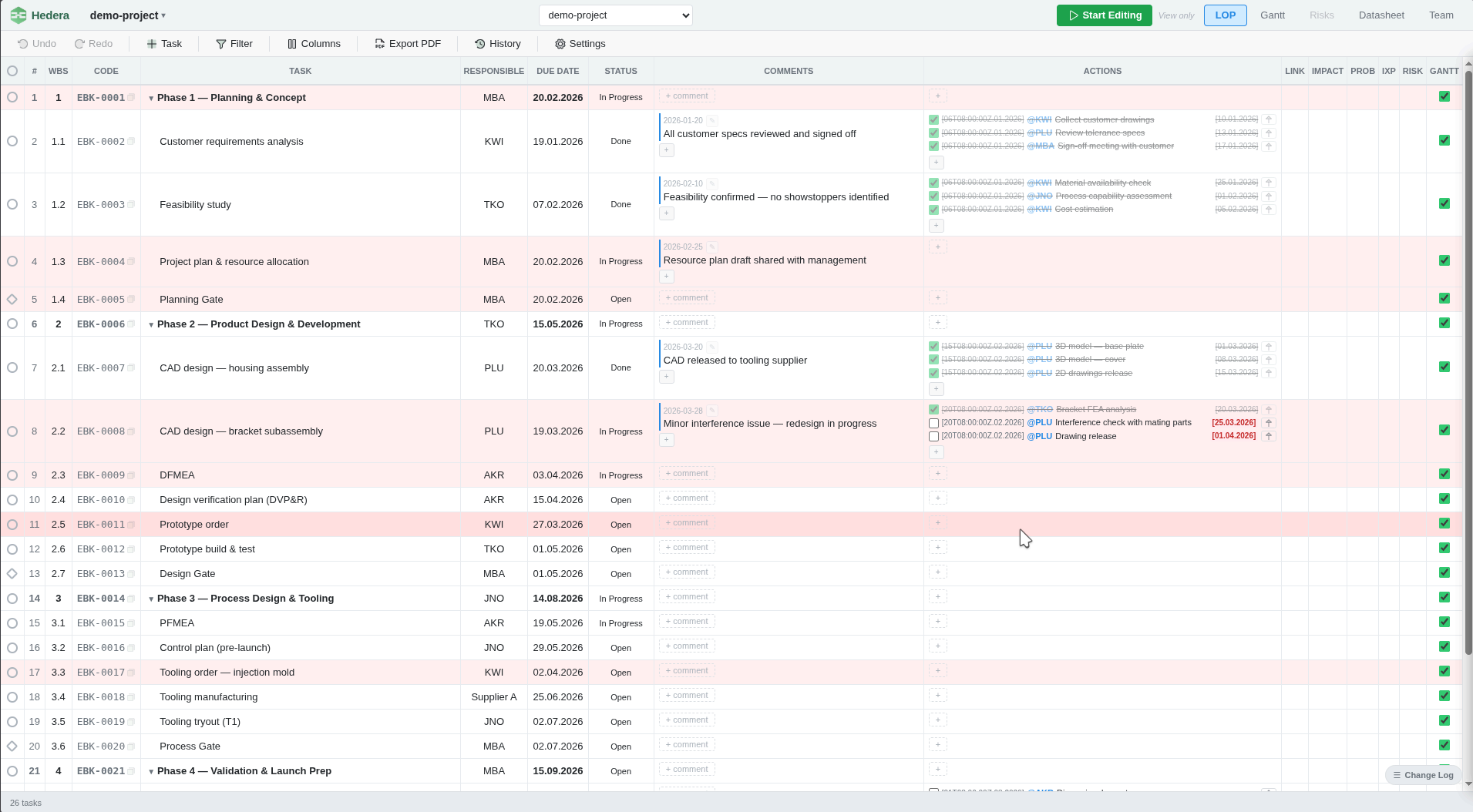
Full-width task table optimized for status tracking. 15+ configurable columns. Inline subtask management with @person assignment. Status badges with deadline coloring — green, yellow, red. Filter by status, responsible person, department, or date range. The view your team uses in weekly meetings.

Hedera LOP View

Matrix View

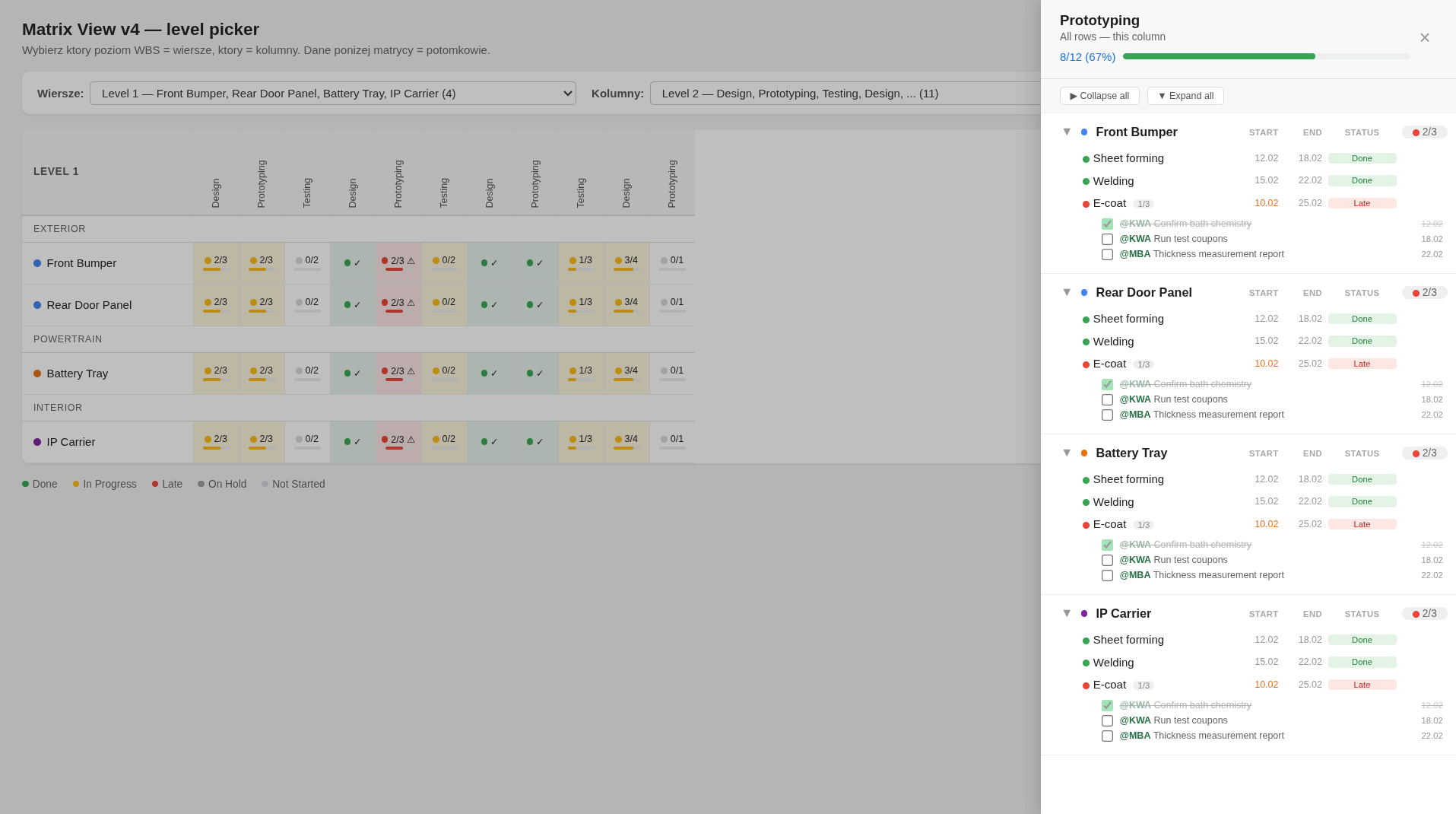
Parts (rows) × Operations (columns) — a cross-reference dashboard unique to Hedera. Each cell shows completion ratio, status dot, and progress bar with heat-map coloring. Click a cell to drill down into tasks. Perfect for automotive programs tracking multiple parts across shared operations.

Hedera Matrix View

Built for people who manage real schedules.

Manufacturing PMs

You manage APQP timelines across 20 suppliers, each with their own tooling, PPAP, and testing milestones. You need to see dependencies across workstreams — not just a flat task list.

Energy & Construction

Your turnaround schedule changes every shift. When inspection finds new work, you need to see impact on critical path in minutes, not hours. Every day of delay costs seven figures.

Teams Who Left MS Project

You tried the "real" tools. They were too slow, too complex, or too expensive. You went back to Excel — but you miss auto-scheduling and dependency tracking. Hedera gives you both.

Distributed Teams

Your team members are in 3 countries and 4 time zones. They need to see the schedule and update their tasks — without VPN, without licenses, without training.

21
hours / week

A program manager runs 7 automotive projects. Maintains two separate systems — Gantt in one tool, task list in another. Manually cascades dates after every change. Builds reports by hand before every meeting.

7
hours / week

One tool. Gantt + LOP + subtask checklists. Auto-cascading dates. Change reports generated automatically. The same work — in a third of the time.

How teams use Hedera.

Real workflows, step by step.

  1. 1
    Open your project → click Start Review
  2. 2
    Switch to LOP view → filter by "In Progress" or "Overdue"
  3. 3
    Update statuses and dates inline — the scheduler cascades changes automatically
  4. 4
    Add subtasks and comments as you discuss each point
  5. 5
    Click Finish Review → Hedera generates a change summary
  6. 6
    Copy to clipboard → paste into email as meeting minutes
  1. 1
    Open your project → Gantt view, zoom to month for full overview
  2. 2
    Export PDF Gantt with milestones and critical path — send as pre-read
  3. 3
    In the meeting: show the live Gantt on the projector
  4. 4
    "What if tooling is delayed 2 weeks?" → drag the task → cascade shows the impact instantly
  5. 5
    Export updated PDF → send as follow-up with decisions captured
  1. 1
    Open LOP view → filter by supplier name (responsible)
  2. 2
    Share screen or send PDF before the call
  3. 3
    Walk through open items — update statuses live as you discuss
  4. 4
    Delivery date changed → edit inline → see milestone impact immediately
  5. 5
    Finish Review → copy change summary → email to supplier as minutes
  1. 1
    Open Hedera → you're in the schedule (LOP or Gantt, whichever you used last)
  2. 2
    Check what changed — the Change Log badge shows the delta
  3. 3
    Delayed task? Click "Why this date?" → see the driving dependency chain
  4. 4
    Update dates, add comments, mark subtasks as done
  5. 5
    Ctrl+S → saved. Done.

How Hedera compares.

Hedera MS Project Smartsheet Monday / Asana
Price Free $360/yr $228/yr $108/yr
Installation None 4 GB + Windows Cloud only Cloud only
Startup time < 1 second 10–30 s Network Network
Learning curve 5 minutes Days – weeks Hours Hours
Works offline Partial No No
Critical Path (CPM) Partial No
Dependency types All 4 All 4 FS only FS only
Explains scheduling No No No
Data location Your machine Your machine Cloud Cloud
Corporate audit risk None License audit Cloud DPA Cloud DPA

No server. No problem.

Most scheduling tools either live in the cloud — your data leaves your machine — or require installation — IT approval, license audits, compliance reviews. Hedera is neither. It's a file you open in your browser.

  • No IT approval neededIt's a webpage, not installed software
  • No license auditThere's nothing to audit
  • No data leaves your machineCompliant by architecture, not by policy
  • No vendor lock-in.hds is readable JSON — you own your data forever
  • No single point of failureNo server to go down, no subscription to expire

Your existing backup, encryption, and data classification policies cover .hds files automatically — because they're just files on your drive.

Up and running in 60 seconds.

1

Download

Single .zip file, ~3 MB

2

Unzip

Anywhere on your computer

3

Open

hds.html in Chrome, Edge, or Firefox

4

Start typing

Click a cell, enter task name, press Tab

Download Free

No account required · No installation · Works offline